How to Get a WLL CR in Bahrain (Step-by-Step)
How to Get a WLL CR in Bahrain: A Complete Step-by-Step Guide
Setting up a wll cr in bahrain takes 2 to 4 weeks depending on your business activities. You will navigate the Ministry of Industry and Commerce (MOIC) Sijilat system to secure legal authorization to operate and hire employees.
Most founders fail because they sign a commercial lease before getting MOIC initial approval. This mistake results in thousands of Bahraini Dinars wasted on dead rent when the Municipality rejects the location for zoning violations. This guide provides the exact sequence to clear Sijilat, Municipality, and Notary requirements without risking premature capital investment.
What You Need Before Starting
Before initiating your application for a wll cr in bahrain, you must assemble specific digital credentials and authenticated documents. Missing these will hard-stop your application on day one.
Securing an Advanced eKey via the Information & eGovernment Authority (iGA)
You cannot access the Sijilat portal with a standard eKey. You need an Advanced eKey, which requires biometric verification.
Visit an iGA self-service kiosk (located in major malls like City Centre or Seef Mall) with your physical CPR card. Insert your CPR, scan your fingerprint, and upgrade your account. This takes five minutes and grants immediate access to the MOIC portals.
Preparing Partner Passports, CPRs, and Proof of Address Documents
The MOIC requires high-resolution scans of all partner identification. Scan the passport data page and both sides of the CPR card for each partner.
Save these as separate PDF files under 2MB each. You must also provide a proof of address, such as an EWA (Electricity and Water Authority) bill or a bank statement. The document must display the partner's name and residential address, and it cannot be older than three months.
Capital Requirements: Navigating the Minimum BD 50 vs. Activity-Specific Capital Rules
The legal minimum share capital for a standard WLL is BD 50. However, registering with only BD 50 creates severe banking friction later.
Local corporate banks like NBB and BBK generally reject account applications for companies with less than BD 1,000 in stated capital. Furthermore, specific ISIC4 activities (like real estate or logistics) mandate higher statutory capital ranging from BD 5,000 to BD 50,000. Check the Sijilat activity search tool to verify the exact capital requirement for your intended operations before drafting your application.
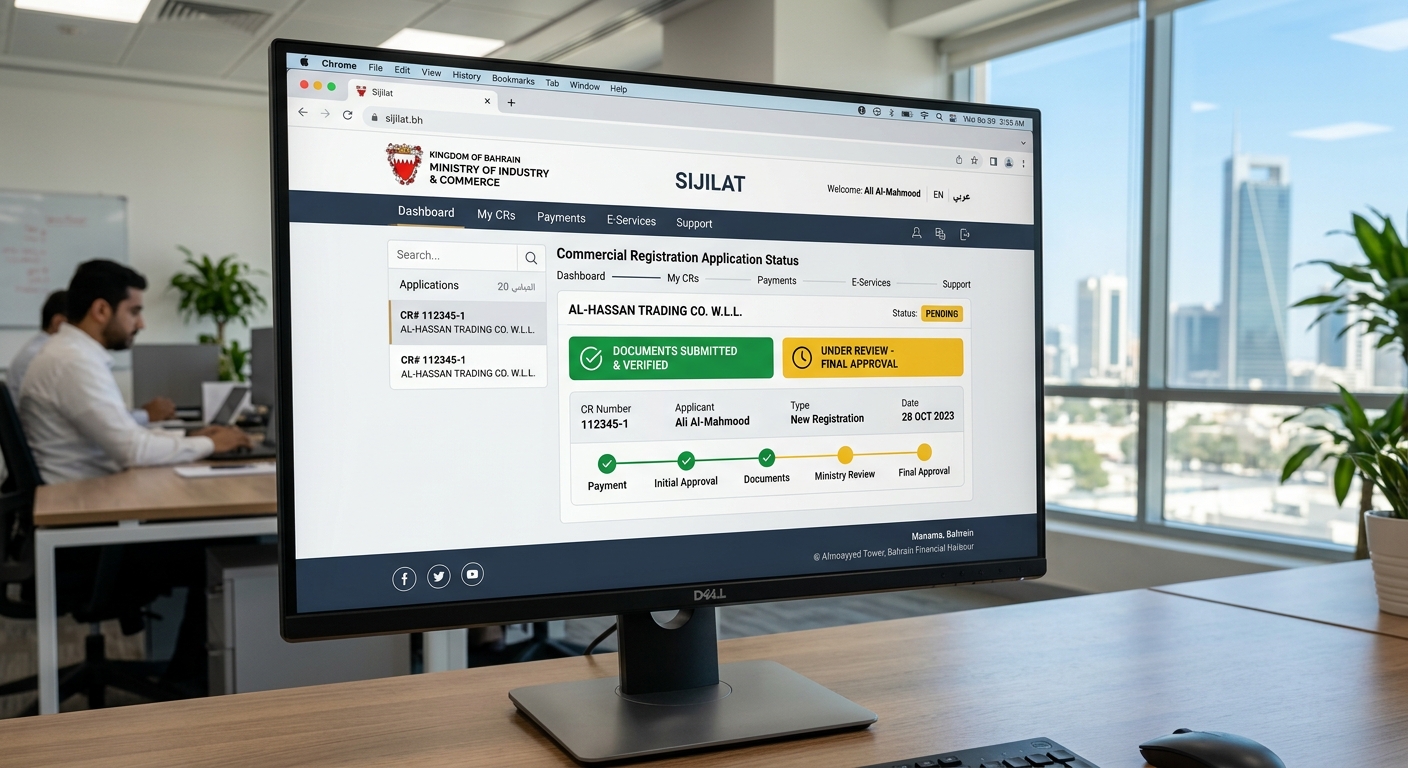
Step 1: Submit for Initial Approval on Sijilat
This phase registers your company name and locks in your business activities for preliminary MOIC review.
Warning: Do not sign any commercial lease or pay rent before completing this step. MOIC reserves the right to reject your business activities entirely.
- Log into Sijilat.bh using your Advanced eKey.
- Click "Commercial Registration" in the top menu, then select "Apply for a New CR".
- Enter 3 to 4 proposed company names in order of preference.
- Search and select your exact ISIC4 activity codes from the drop-down menu.
- Upload your PDF identification documents in the attachments section.
- Pay the BD 50 non-refundable review fee using the Fawateer payment gateway.
Expected Outcome: You will see a confirmation screen with an Application Number (e.g., APP-2023-XXXX). The application status will change to "Pending Initial Approval."
If this fails: If the payment screen times out, do not click pay again. Check your BenefitPay or bank app history first to avoid double charges. If the charge went through, the Sijilat system will update within 2 hours.
Selecting 3 to 4 Compliant Company Names to Prevent Rejection
When registering a wll cr in bahrain, you must submit multiple name options because the MOIC strictly enforces naming conventions.
Avoid using the word "Bahrain" in your name unless your company capital exceeds BD 250,000. Do not use names that mimic existing global trademarks or imply government affiliation. If your first choice is rejected, the reviewer automatically evaluates the second, preventing the need to restart the application.
Mapping Your Business Model to Exact ISIC4 Activity Codes
Your ISIC4 codes dictate which government ministries must approve your application. Adding "Software Development" requires only MOIC approval, taking 2 days.
Adding "Telecommunications Equipment Sales" triggers a mandatory review by the Telecommunications Regulatory Authority (TRA), adding 3 weeks to your timeline. Only select the activities you plan to execute in the first 12 months to avoid unnecessary external entity delays.
Step 2: Secure a Commercial Address and Municipality Approval
Once you receive "Initial Approval" status on Sijilat, you have a 6-month window to secure a physical address.
Choosing Between a Physical Office and an Approved Business Center (Incubator)
You must decide between leasing an independent office space or renting a desk in an MOIC-approved business center.
Business centers (incubators) cost BD 150 to BD 300 per month and include pre-approved municipality zoning, meaning instant address approval. Independent offices cost BD 300+ per month but offer physical privacy and allow you to register multiple LMRA visas. Choose an incubator if speed and low upfront cost are your priorities; choose an independent office if you need to hire more than two foreign employees immediately.
Drafting a Lease Agreement with an Existing Commercial Sijil Holder
- Request a draft lease agreement from your landlord.
- Verify that the landlord's CR and the building's Municipality Permit are active.
- Obtain the exact EWA Electricity Account Number for the specific office unit.
- Ensure the lease start date begins after your MOIC Initial Approval date.
Expected Outcome: You hold a signed lease agreement and the 10-digit EWA account number for the premises.
If this fails: If the landlord cannot provide a dedicated EWA number for your unit, walk away. The Municipality will reject the address if multiple businesses share a single EWA meter without proper sub-division approvals.
Passing the Municipality Desk Inspection via the Sijilat Portal
- Open your pending application in Sijilat.
- Navigate to the "Address Details" tab.
- Enter the 10-digit EWA account number.
- Upload the signed lease agreement as a PDF.
- Submit the application for Municipality review.
Expected Outcome: Within 3-5 business days, the status will update from "Pending Municipality" to "Pending Notary."
If this fails: If the status changes to "Rejected by Municipality," check the reviewer comments. The most common reason is unpaid municipal fees by the previous tenant. You must force the landlord to clear these arrears before resubmitting.

Step 3: Draft and Notarize the Memorandum of Association
Your wll cr in bahrain is not legally binding until the partners sign the Memorandum of Association (MOA) in front of a licensed Bahraini notary.
Drafting the MOA Using the Standard MOIC Template
Do not pay a lawyer thousands of dinars to draft a custom MOA unless you have complex vesting schedules or uneven profit-sharing.
The Sijilat system automatically generates a standard Arabic/English MOA template based on your partner details and capital distribution. Download this template directly from the portal. It contains all mandatory legal clauses required by the Bahrain Commercial Companies Law.
Booking an Appointment with a Private Notary or the Ministry of Justice
- Print three physical copies of the MOIC-generated MOA.
- Book an appointment with a Private Notary (takes 24 hours, costs BD 50-100) or the Ministry of Justice (takes 2-3 weeks, costs BD 15).
- Bring all partners, original passports, and original CPRs to the appointment.
- Sign the documents in the presence of the notary to receive the official stamps.
Expected Outcome: You walk out with physically stamped and notarized copies of your MOA.
If this fails: If a partner cannot attend physically, they must provide a notarized and apostilled Power of Attorney (POA) to a representative. The notary will reject the signing if the POA is not translated into Arabic by a certified local translator.
Uploading the Fully Executed MOA to the Sijilat Portal
- Scan the fully stamped and signed MOA into a single PDF document.
- Log back into your Sijilat application.
- Navigate to the "Company Documents" tab.
- Upload the notarized MOA file.
- Click "Submit for Final Review."
Expected Outcome: The application status changes to "Pending Final Payment."
Step 4: Pay Final Fees and Issue the CR
To finalize your wll cr in bahrain, you must clear the accumulated government fees to generate the active registration.
Calculating Final MOIC, Municipality, and BCCI Fees
The final invoice combines several mandatory charges. You will pay a BD 100 MOIC commercial registration fee.
You will also pay the Bahrain Chamber of Commerce and Industry (BCCI) membership fee, which costs BD 20 to BD 100 depending on your capital size. Finally, you will pay the first month's Municipality fee, typically calculated at 10% of your monthly office rent.
Processing the Final Payment Securely Through the Fawateer System
- Open the payment tab in your Sijilat application.
- Click "Generate Fawateer Bill."
- Copy the generated Fawateer reference number.
- Open the BenefitPay app on your phone, select Fawateer, and choose "Sijilat."
- Paste the reference number and process the transfer.
Expected Outcome: The Sijilat portal will refresh within 5 minutes, and the application status will change to "Active."
If this fails: If the Fawateer bill expires (usually after 24 hours), you must click "Generate Fawateer Bill" again in Sijilat to create a new reference number. Do not attempt to pay an expired bill.
Downloading Your Digital WLL CR Certificate
- Navigate to the "Active CRs" section on your Sijilat dashboard.
- Click on your new CR number.
- Select "Print CR Certificate."
- Save the document as a PDF.
Expected Outcome: You possess the official digital CR certificate featuring a QR code for verification.
Common Mistakes That Cause Application Failure
Operating a wll cr in bahrain requires strict adherence to regulatory sequencing. Deviating from the standard path usually results in stalled applications.
Choosing Activities That Trigger Unplanned External Approvals
Founders frequently select broad ISIC4 codes thinking it gives them flexibility. This backfires.
Selecting "Health Supplements" triggers the National Health Regulatory Authority (NHRA). Selecting "Fintech" triggers the Central Bank of Bahrain (CBB). Selecting "Training Center" triggers the Ministry of Education (MOE). These external approvals require massive capital proofs, specialized facility inspections, and months of delay. Only select codes you strictly need to invoice your first customers.
Signing a Lease Agreement Before Securing MOIC Initial Approval
Do not commit to a 12-month commercial lease before Sijilat grants Initial Approval.
If the MOIC rejects your company name or business activities, you must restart the application. If the Municipality rejects the building because it lacks sufficient commercial parking, your lease is useless. You will be legally bound to pay rent for an office you cannot register a business in. Always make the lease agreement legally contingent on CR approval.
Mismatched Partner Signatures or Missing Power of Attorney at the Notary Stage
The Ministry of Justice notary will compare the signatures on your MOA against the signatures on your passport.
If a partner signs the MOA with a different style than their passport signature, the notary will refuse to stamp the document. Warn all foreign partners to replicate their exact passport signature. If using a POA, the document must explicitly state "Authorization to establish a With Limited Liability Company and sign the Memorandum of Association." Vague POAs are instantly rejected.
How to Know It Worked: Verifying Your Active Status
You must verify that your company data propagated correctly across the government network before approaching banks.
Checking for the 'Active Without Inconsistencies' Status on Sijilat
Log into Sijilat and search for your CR number in the public search bar. The status indicator next to your company name must display a green tag reading "Active."
If it reads "Active with Inconsistencies," you are missing a secondary requirement (like an ultimate beneficial ownership declaration) and banks will refuse your account application.
Extracting Your Official Commercial Registration Extract (Mustakhraj)
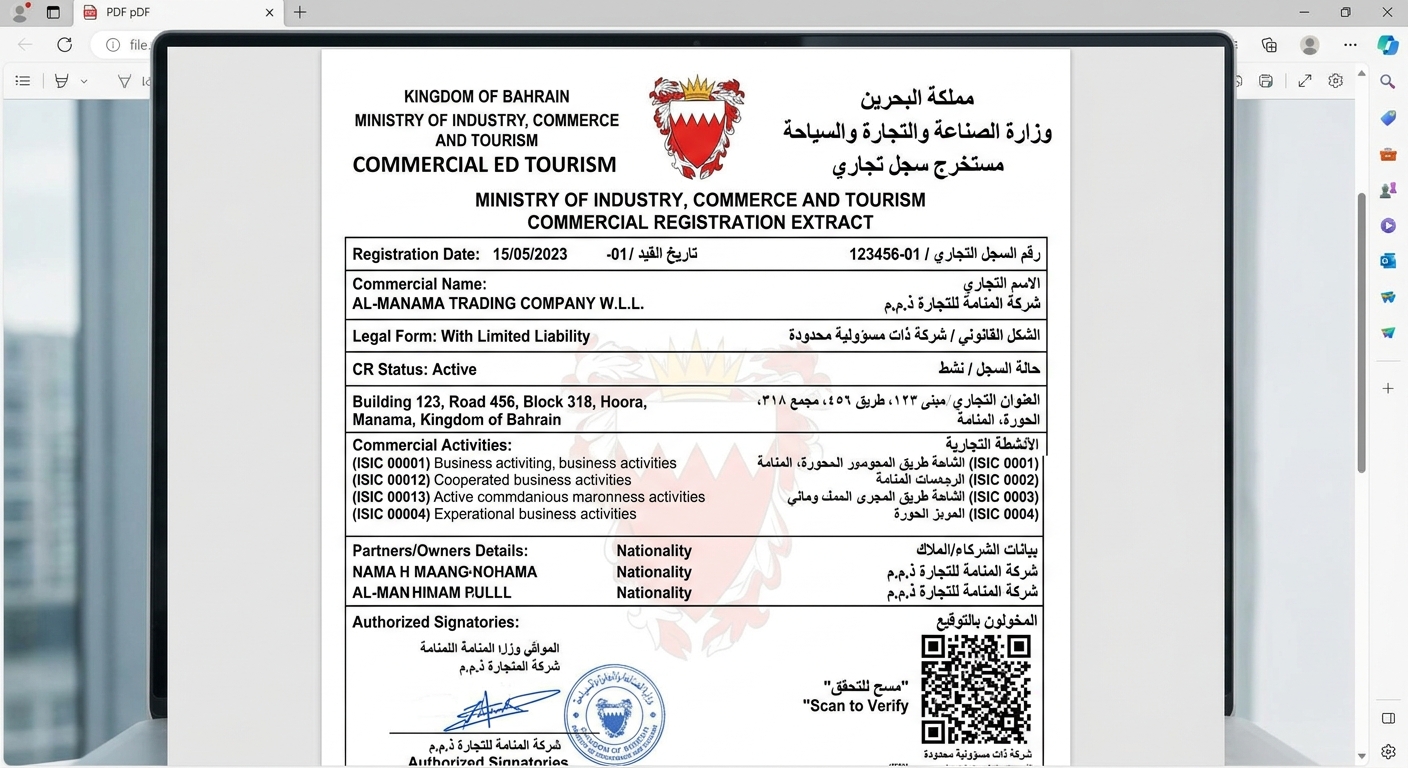
The CR Certificate proves you exist, but the CR Extract (Mustakhraj) proves who owns the company.
Navigate to your Sijilat dashboard, select your CR, and download the "Commercial Registration Extract." This 3-to-4 page document lists all partners, their CPR/Passport numbers, ownership percentages, and authorized signatories. Check every spelling and CPR number immediately. If there is a typo, you must file an amendment application.
Validating Your Bahrain Chamber of Commerce and Industry (BCCI) Membership
Your BCCI membership activates automatically upon final payment. Go to the BCCI online portal and enter your CR number.
The system should return a valid membership certificate. You need this specific PDF to participate in public government tenders or register as a supplier with major Bahraini corporations like Bapco or Alba.
You have successfully registered your wll cr in bahrain by securing initial MOIC approval, passing municipal address checks, notarizing your MOA, and clearing the final Sijilat fees.
If your application remains stuck in 'Pending' status for more than 14 days at any stage, log into Sijilat to check for specific external entity comments, or visit the MOIC physical helpdesk at Bahrain Financial Harbour. Your logical next steps are opening a corporate bank account with a local bank (bringing your MOA, CR Extract, and lease agreement) and registering your company with the Labour Market Regulatory Authority (LMRA) to begin processing employee visas.