How to Complete Bahrain Company Formation in 5 Steps
You will secure an Active Commercial Registration (CR) from Bahrain's Ministry of Industry and Commerce (MOIC) by following this exact workflow. Completing a Bahrain company formation takes approximately 2 to 4 weeks and requires moderate administrative effort navigating government portals.
The most frequent reason founders face delays is signing a commercial lease before confirming their specific business activities align with municipal zoning laws. By strictly following the Sijilat system sequence—securing preliminary approvals before committing capital to real estate or legal fees—you prevent costly rejections and ensure compliance with the Commercial Companies Law.
What You Need Before Starting Your Sijilat Application
Do not begin the application process until you have gathered the mandatory legal documents, capital, and system access credentials. Attempting to start without these will cause your application session to time out.
Advanced eKey Requirements for Sijilat Access
You must possess an Advanced eKey to access the Sijilat V3.0 portal. This digital identity ties your biometric data to your legal signature, preventing corporate identity theft. If you are in Bahrain, visit an Information & eGovernment Authority (iGA) kiosk to upgrade your standard eKey using your fingerprint. Foreign investors outside Bahrain must authorize a registered local agent via a notarized Power of Attorney to access the system on their behalf.
Minimum Capital Proof (BD 1,000 to BD 20,000 depending on entity)
You must prove you have the liquid capital required for your specific corporate structure. A standard With Limited Liability (WLL) company requires a minimum share capital of BD 20,000, while a holding company requires BD 1,000. You do not need to deposit this money on day one, but you must have it available in a liquid account for Step 5.
Required Passports, Visas, and GCC ID Documents
Scan all founder passports, current visas, and national identity cards (CPR for Bahrain residents or GCC ID for Gulf nationals) into individual PDF files under 2MB each. The Sijilat portal will reject larger file sizes, forcing you to restart the upload sequence.
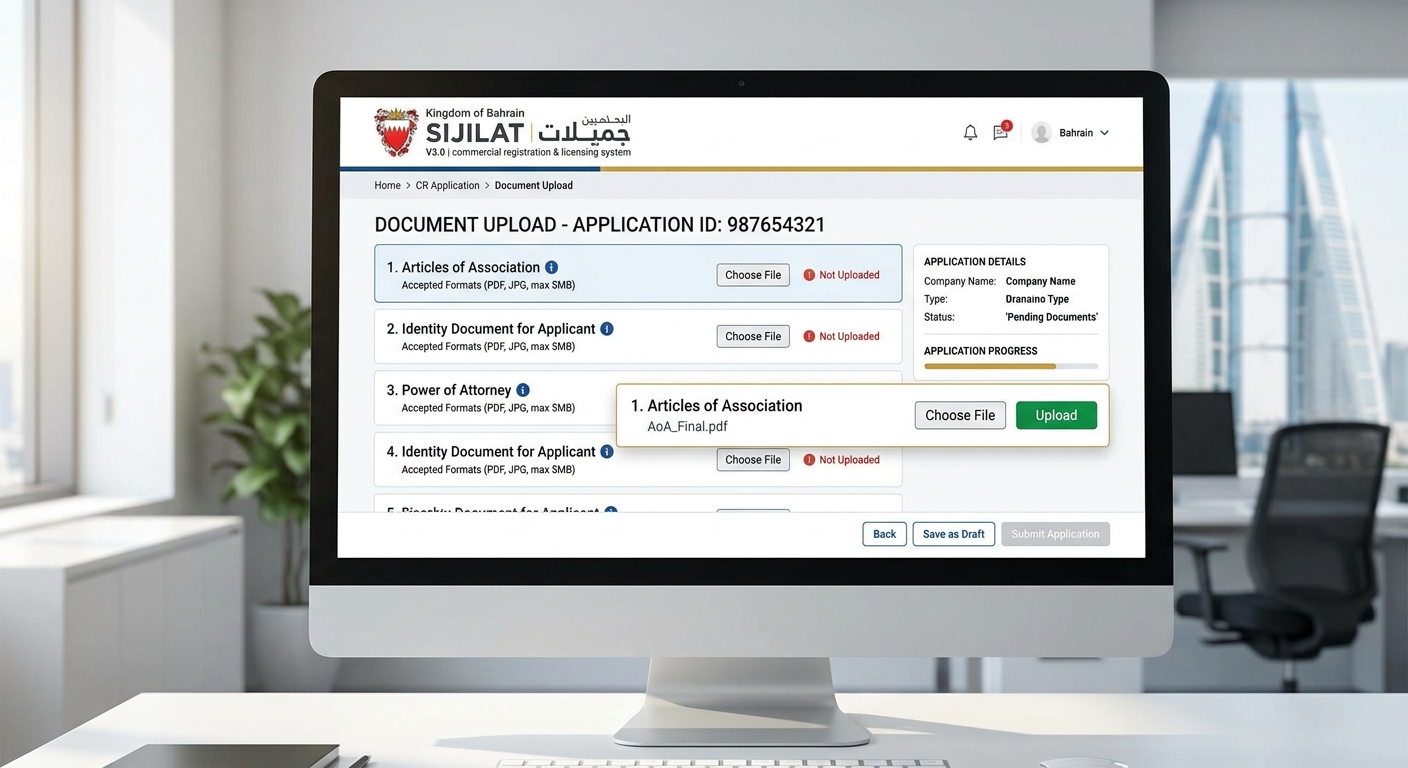
Step 1: Select Your Legal Structure and ISIC4 Business Activities
Define your corporate entity type and match your exact business operations to the government classification system.
Choose Between WLL and Individual Establishment
Select a With Limited Liability (WLL) structure to protect your personal assets from corporate debt. Recent updates to Bahrain's Commercial Companies Law absorbed the old Single Person Company (SPC) structure into the WLL framework. You can now form a "WLL Owned by a Single Person" if you are a solo founder, giving you the liability protection of a corporation without needing a second shareholder.
Map Your Operations to Exact MOIC ISIC4 Codes
Search the MOIC ISIC4 directory to find the exact code matching your core revenue-generating activity. Do not select broad categories. If you plan to build software, select "Computer programming activities" (Code 6201), not "Information service activities." Selecting the wrong code dictates which external ministries must approve your application later.
Identify Activities that Require 100% Bahraini Ownership
Review the foreign ownership restrictions on your chosen ISIC4 code before proceeding. While Bahrain company formation allows 100% foreign ownership for most sectors, specific activities like real estate brokerage, press publication, and certain telecommunications require majority or full Bahraini ownership. If your activity is restricted, you must secure a local partner before moving to Step 2.
Expected Outcome: You have a written list containing your chosen corporate structure, 1-3 specific ISIC4 codes, and confirmation that your nationality is eligible for those codes.
Step 2: Submit for Initial Approval and Reserve Your Company Name
Secure preliminary clearance from the MOIC and lock in your official corporate name.
Navigate the Sijilat V3.0 Portal Application
Log into the Sijilat portal using your Advanced eKey and click "Apply for a New CR." Input your selected ISIC4 codes and founder details. The system generates a dynamic checklist of required documents based on your specific inputs.
Clear the 3-Name Reservation Protocol
Submit three distinct proposed company names in order of preference. The MOIC rejects names that are phonetically identical to existing brands, contain religious references, or imply government affiliation. Use a unique primary identifier followed by your business activity (e.g., "Apex Software Solutions W.L.L.").
Review the CR Without License (CRWL) Status
Pay the initial application fee of BD 50 through the Fawateer payment gateway. When the MOIC approves your name and initial structure, the system issues a "CR Without License" (CRWL).
Expected Outcome: Your Sijilat dashboard displays a CR number with the status "CR Without License." You should see a notification prompting you to secure a commercial address.
If the status shows "Returned for Editing," read the exact comment left by the MOIC reviewer in the notification center before modifying your application.
Step 3: Secure a Municipality-Approved Commercial Address
Obtain a physical operating location that passes local municipal zoning inspections.
Verify Zoning Laws Before Signing a Lease Agreement
Check the municipal zoning map for your target office space before signing a commercial lease. The municipality strictly enforces zoning based on ISIC4 codes; a retail ISIC4 code cannot operate in an office-only building. Ask the landlord for the building's "Municipal Approval Certificate" to verify it is zoned for your specific activity.

Use Approved Business Incubators (e.g., Bahrain FinTech Bay, DPT)
Sign a lease with an MOIC-approved business incubator if you operate a services or technology company and want to bypass municipal zoning delays. Incubators like Bahrain FinTech Bay or DPT offer virtual or hot-desk addresses for BD 150 to BD 300 per month. This route guarantees immediate address approval in the Sijilat system.
Upload the Stamped Lease to the Sijilat Portal
Scan your signed lease agreement and the landlord's title deed, then upload them to your pending Sijilat application. The system automatically routes these documents to the relevant Municipality for approval.
Expected Outcome: The address section on your Sijilat dashboard changes from "Pending Approval" to "Approved."
If the municipality rejects the address, you must terminate your lease (using the zoning contingency clause you negotiated) and find a compliant location.
Step 4: Draft and Notarize the Memorandum of Association (MoA)
Finalize the legal framework regulating shareholders and corporate governance.
Select Standard vs. Custom MoA Templates on Sijilat
Choose the MOIC standard MoA template directly within Sijilat if you have a simple equity split and standard governance needs. This option is free and generates instantly. Choose a custom MoA drafted by a Bahraini law firm (costing BD 500+) only if you require complex vesting schedules, specific board seat allocations, or asymmetric dividend distributions.
Book the Ministry of Justice Private Notary Appointment
Schedule an appointment with a Private Notary licensed by the Ministry of Justice. Do not use the public notary at the ministry headquarters, as wait times often exceed three weeks. Private notaries charge approximately BD 30 to BD 50 but can meet you at your office within 24 hours.
Execute the MoA with Authorized Signatories
Gather all shareholders to sign the MoA in the physical presence of the Private Notary. The notary verifies your identities, stamps the document, and digitally registers it with the Ministry of Justice. Upload this stamped MoA back into your Sijilat application.
Expected Outcome: You possess a legally binding, notarized MoA, and the Sijilat portal accepts the uploaded document without error flags.
Step 5: Deposit Minimum Capital and Activate the Commercial Registration (CR)
Prove financial compliance to convert your preliminary CR into an Active CR. Ensure you complete this step promptly, as failing to deposit capital within the required timeframe is a primary cause of expired applications during Bahrain company formation.

Open a 'Capital Under Formation' Bank Account
Visit a retail bank in Bahrain (such as BBK, NBB, or Ila Bank Corporate) and request a "Capital Under Formation" account. Present your CRWL certificate and notarized MoA. The bank will open a restricted account that only accepts inbound deposits.
Obtain the Capital Deposit Certificate from a Bahraini Bank
Transfer your exact required share capital (e.g., BD 20,000) into this new account. Request a formal "Capital Deposit Certificate" from the branch manager. The bank will freeze these funds until your CR becomes fully active.
Pay the Final MOIC Fees
Upload the Capital Deposit Certificate to Sijilat. Once the MOIC verifies the document, the system generates your final invoice. Pay the final MOIC fees, which range from BD 50 to BD 1,000 depending on your specific ISIC4 activities and municipal footprint.
Expected Outcome: The Sijilat system processes your payment and instantly changes your company status to "Active CR."
Common Mistakes That Cause MOIC Rejections
Avoid these critical errors in planning and execution that result in application denial or lost funds.
Signing Office Leases in Residential-Only Zones
Founders frequently lease villas in residential areas of Saar or Janabiyah, assuming they can operate quietly. The municipality relies on strict cadastral maps and will categorically reject any commercial registration tied to a residential plot, forcing you to forfeit your rent deposit. Only lease properties explicitly zoned for commercial use.
Selecting Restricted Activities Requiring CBB or NHRA Approval
Many applicants select "Financial Consulting" or "Medical Device Trading" without realizing these trigger secondary reviews by the Central Bank of Bahrain (CBB) or the National Health Regulatory Authority (NHRA). These external approvals require extensive professional credentialing and can delay your Bahrain company formation by 3 to 6 months. Choose unregulated B2B service codes if your business model permits it.
Missing the 30-Day Capital Deposit Window
You have exactly 30 days from the moment your MoA is approved to deposit your share capital and upload the certificate. If you miss this window, the MOIC automatically cancels your CRWL. You will have to restart the entire application process and pay the initial fees a second time.
How to Know It Worked: Verifying Your Active CR
Confirm the legal existence of your company and its readiness for operational licensing.
Download the Active CR Certificate via Sijilat
Navigate to the "My CRs" tab in Sijilat and click the print icon next to your company name. You should see a formal PDF document titled "Active Commercial Registration" containing your CR number, corporate address, and listed activities.
Test the CR Status in the Public MOIC Search Directory
Log out of your account and visit the public Sijilat search page. Type your new company name into the search bar. Your company must appear in the public registry with a green "Active" badge. If it shows "Deleted" or "Without License," your final payment did not process correctly.
Confirm the Generation of the Company Establishment Code
Check your email for an automated message from the Labour Market Regulatory Authority (LMRA) containing your Company Establishment Code. This confirms the MOIC successfully synced your new corporate identity with the immigration system, allowing you to hire staff.
Conclusion: Successfully navigating Bahrain company formation requires selecting precise ISIC4 codes, securing initial MOIC approval, registering a municipality-approved address, notarizing your MoA, and depositing your share capital within strict deadlines. If your application stalls during the Sijilat review process, immediately check the portal's notification center to identify which specific external entity requires additional documentation. Once your CR is active, your immediate next steps are registering with the Labour Market Regulatory Authority (LMRA) to issue employee visas and returning to your bank to convert your 'Under Formation' account into an operational corporate checking account.